


My team mocks me endlessly for my love of Excel and takes great delight in telling me, “Excel is dead.” I usually remain silent while they build integration models in Excel, create data sets that link to Excel forecasts, and gradually use the tool even more. I smile, knowing Excel is not dead. It has simply been upgraded to a more powerful and intelligent version.
For decades, Excel has been the finance team’s most trusted tool. PivotTables, Goal Seek, macros and slicers are part of our daily work. We all know the familiar cycle of exporting data, building reports, balancing figures, investigating variances and preparing board packs. And that is only half the job. Next come the questions and the need to explain what it all means.
The good news is the spreadsheet isn’t going anywhere and yet everything is charging. The balance is moving from preparing to analysing. In a recent session I presented on AI Reporting for Financial Managers, I asked the following question: How much time do finance teams spend preparing reports compared to analysing them? For 85% of the people attending, the honest answer was still “mostly preparation”. That is where Microsoft Copilot in Excel is becoming a game changer.
Rather than replacing finance teams, AI helps automate the repetitive, low-value work so the teams can focus on insight, strategy, risk, and decision-making. As I often say, AI is not a replacement for financial expertise. It is an accelerator for them.
The Shift from Reporting to Insight
Traditional reporting often involves manual extraction, spreadsheet manipulation, ratio calculations, and narrative writing. By the time the report reaches management, much of the team’s energy has been spent producing it rather than interpreting it.
Copilot changes that dynamic.
Instead of asking, “How do I build this report?” finance professionals can ask, “What is the story behind these numbers?”
The real power lies in asking better questions:
1. Explain Variances Instantly
Instead of manually reviewing hundreds of rows, simply ask:
“Explain the major variances between this month and last month.”
Copilot can identify significant movements and provide a narrative explaining what has changed, allowing finance teams to focus on validation and action rather than investigation. Automated variance analysis is one of the most practical AI reporting capabilities available today.
2. Identify Unusual Trends
Ask:
“Identify unusual trends across the last 12 months.”
Humans are good at finding obvious trends. AI is better at spotting subtle patterns across multiple periods that may otherwise go unnoticed. Pattern recognition is one of AI’s strongest capabilities in financial analysis.
3. Summarise Complex Financial Models
Many financial models become so complex that only the creator truly understands them.
Ask:
“Summarise this model and explain the key assumptions.”
Copilot can quickly translate technical spreadsheets into plain language, making models more accessible for executives and business leaders.
4. Create Executive Summaries for the Board
One of my favourite use cases.
Ask:
“Act as a CFO and prepare a one-page board summary focusing on liquidity, sustainability, risks and key decisions required.”
This mirrors the type of prompting we teach finance teams: provide the role, audience, context, and required outcome. The result is often a strong first draft of a board-ready summary.
5. The list is endless
Ask:
“Identify the top financial risks in this forecast and explain the potential impact.”
“Forecast the next three months based on current trends and seasonality.”
“Create management commentary on revenue, gross margin, expenses and cash flow in plain language.”
“Calculate the key financial ratios and explain what management should focus on.”
“Based on this information, what should management pay attention to, question and decide?”
“Provide three practical actions management should take to improve performance.”
The Secret Isn’t AI. It’s Prompting.
One lesson consistently emerges whenever I work with finance teams adopting Copilot.
The quality of the output depends on the quality of the prompt.
A prompt such as:
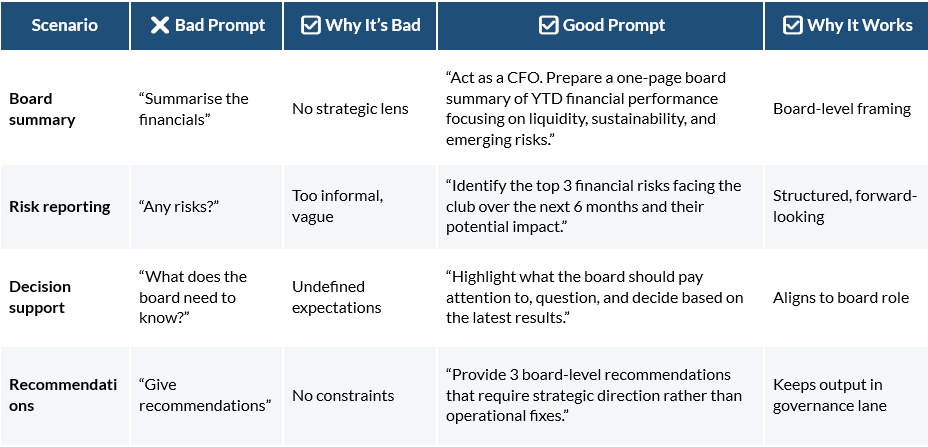
“Analyse these financials.”
will deliver a generic response.
Examples of Poor Prompts:
A much stronger prompt is:
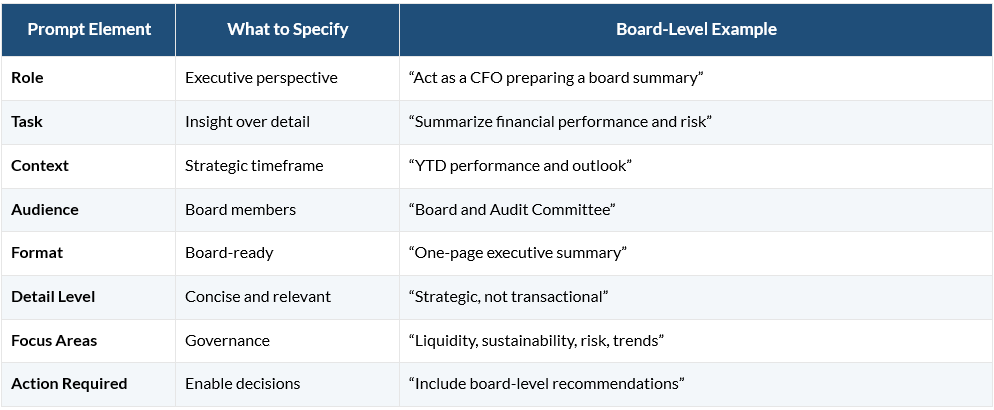
“Act as a CFO. Analyse the March income statement. The audience is the board. Focus on liquidity, sustainability and emerging risks. Summarise the key issues and recommend three strategic actions.”
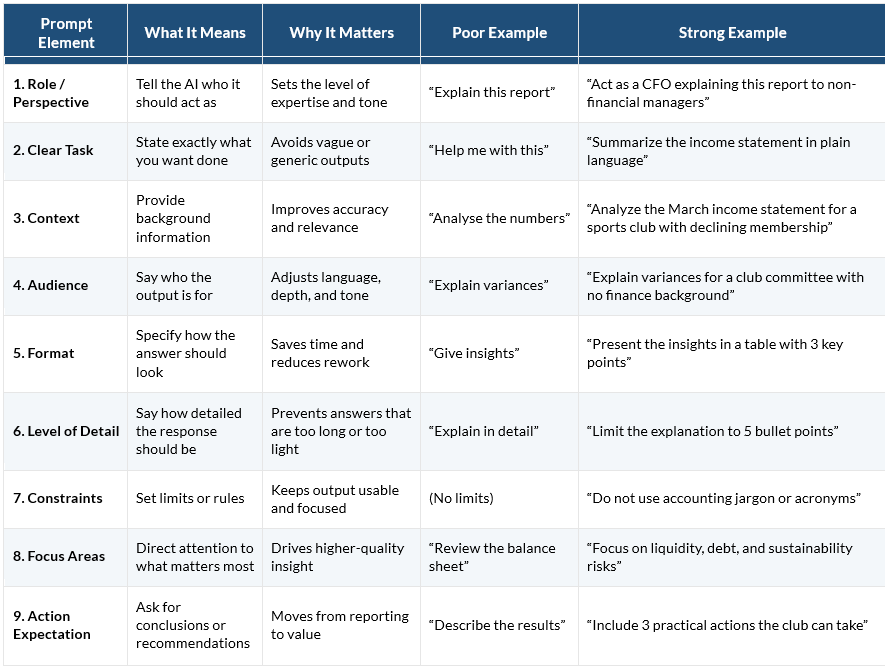
A good prompt provides role, context, audience, focus areas, and desired outcomes. Unsurprisingly, the results are significantly better. Effective prompting is one of the most important AI skills finance leaders can develop.
What a good prompt takes:
An example of building a good prompt:
The Human Still Matters
There is an important caveat. AI should never replace judgement, governance, or accountability.
Finance leaders remain responsible for decisions, controls, and financial outcomes. AI can identify patterns, generate summaries, and suggest recommendations, but human review and approval remain essential. Strong governance, auditability, and oversight should always accompany AI adoption.
The future CFO is someone who uses AI to spend less time reconciling spreadsheets and more time driving strategy.
Final Thought
To my delight, Excel is far from dead. In fact, it may be entering its most exciting chapter yet.
With Copilot, the spreadsheet evolves from a place where data is stored into a place where insight is created. Finance teams can move beyond being report producers and become true strategic advisors.
The question is no longer whether finance will use AI. The question is whether finance leaders will use it to free their teams from the mechanics of reporting and allow them to focus on what really matters: understanding the story behind the numbers and helping the business make better decisions.